 By Admin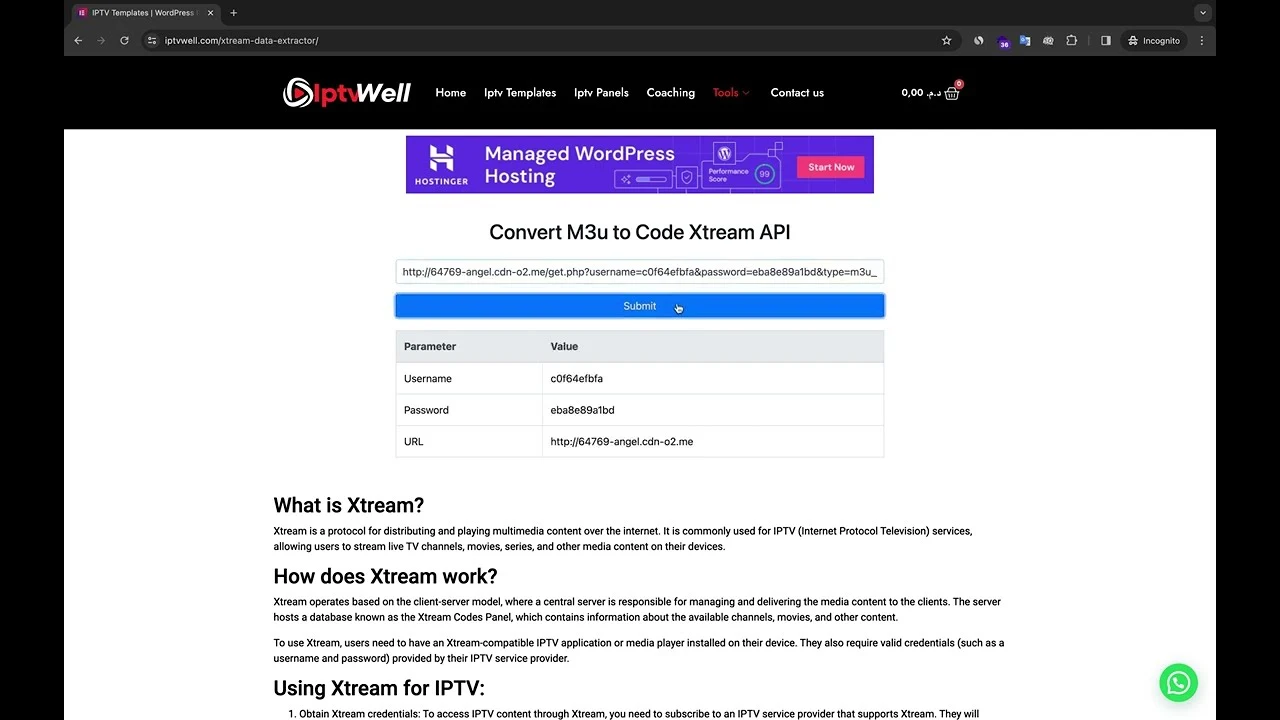
Streaming TV shows, movies, and live channels has become the new normal. But behind the scenes, there’s a lot of tech magic that makes it work smoothly. Two of the most popular ways to access IPTV content are through M3U files and Xtream Codes. If you’ve ever wondered how to convert between these two, you’re in the right place. This guide breaks everything down in plain English.
An M3U file might look like a jumble of text at first glance, but it’s actually a playlist file. Think of it as a road map that tells your media player where to fetch the streams.
Inside an M3U file, you’ll find a list of links—each pointing to a channel or stream. Your IPTV player reads the file and fetches the content in real time. Easy peasy.
- Simple to use: Just load the file into your IPTV app.
- Flexible: Works on most devices, from smart TVs to PCs.
- Lightweight: Since it’s just text, it doesn’t eat up storage.
Xtream Codes is a different way to deliver IPTV content. Instead of using a playlist file, it uses login credentials to fetch streams directly from the provider.
- Username and password-based login.
- Works across multiple devices.
- Supports live TV, movies, and series.
It simplified IPTV usage by eliminating the need for loading bulky playlists. Instead, users just enter their server URL + username + password and start streaming instantly.
- M3U: File-based, simple text format, easy to share.
- Xtream Codes: Credential-based, more secure, user-friendly for apps.
In short, M3U is like a shopping list, while Xtream Codes is like having a membership card for direct access.
You might be wondering—if both work, why bother converting? Well, here’s why:
Some IPTV apps don’t accept M3U files but support Xtream Codes login. Converting helps you use your playlist anywhere.
Xtream Codes login is faster—no need to paste long M3U links every time. Just save your credentials once.
If you’re tech-savvy, you can extract details from your M3U file and format them into Xtream Code credentials. We’ll cover this in the step-by-step guide below.
Many websites let you upload or paste your M3U link and instantly generate Xtream Codes login credentials.
Dedicated apps for PC and Android can handle the process for you, often with extra features like playlist management.
Usually provided by your IPTV provider, it looks something like this:
http://server.com/get.php?username=yourname&password=yourpass&type=m3u_plus&output=ts
From the link above, note:
- Server URL = http://server.com
- Username = yourname
- Password = yourpass
Format it like this:
- Portal URL: http://server.com:8080 (port may vary)
- Username: yourname
- Password: yourpass
Enter the credentials into your IPTV app. If everything’s correct, your channels should load instantly.
- IPTV converters websites – quick, no installation needed.
- Great for one-time conversions.
- Android apps that generate Xtream Codes from M3U.
- Desktop software for playlist organization and conversion.
If the playlist link is broken, the conversion won’t work. Always double-check with your provider.
High traffic or weak servers can cause buffering. Switching servers usually fixes this.
If Xtream Codes credentials don’t work, confirm your username and password were copied correctly.
- Avoid shady websites that may steal your credentials.
- Use trusted IPTV providers only.
- Consider using a VPN for extra privacy.
Other formats exist, like:
- Stalker Portal
- Enigma2
- Kodi Add-ons
Each has its pros and cons, depending on your device.
With streaming tech evolving fast, expect even more secure and user-friendly formats. Xtream Codes may remain strong, but newer systems could replace it in the long run.
Converting an M3U playlist into Xtream Codes isn’t rocket science—it’s just about knowing how to extract and reformat the details. Whether you use online tools or do it manually, this conversion makes IPTV streaming smoother and more convenient across multiple devices. Now that you know the ropes, you’ll never get stuck with an unsupported format again.